Overview
In this recipe, we’ll cook up a tasty recipe block and walk through the process of updating it with block deprecations—the secret ingredient to keeping your blocks fresh while maintaining compatibility with older content. Just like a good chef tweaks recipes over time, developers need to refine their blocks without breaking past creations. So, grab your apron, fire up the editor, and let’s get cooking with block deprecations! 🍽️👨🍳
Setup
You can choose to either use the repository which provides a development environment or to just download the standalone plugin
Standalone
Instructions
Run the following command in a terminal of your choice from inside the plugins directory of your local WordPress installation.
npx @wordpress/create-block@latest recipe-block --template @block-developer-cookbook/recipe-block-deprecationsOnce the scaffold has completed completed, start the build process from inside the newly created plugin
cd recipe-block && npm run startFinally, make sure to activate the plugin.
Repository
Instructions
Checkout the repository (skip this step if already done)
git clone git@github.com:ryanwelcher/block-developer-cookbook.gitInstall the dependencies
npm installStart the development environment (make sure you have Docker installed )
npm run env startRun the following script from the root of the repository
npm run prep:deprecationsOnce the scaffold has completed completed, start the build process from inside the newly created plugin
cd plugins/recipe-block-deprecations && npm run startStep 1 – Dealing with markup changes
For this recipe, we’re going to pretend that you have inherited a block from new client. Originally, the wanted a custom block that displayed their favorite Chocolate Chip Cookie recipe and the original developers created a static block with all of the information hardcoded. Insert a new instance of the block on the page and save the post to see what it looks like.
Classic Chocolate Chip Cookies
Soft and chewy chocolate chip cookies with a perfect golden edge. A timeless recipe that never fails to bring smiles.
Ingredients
- 2 1/4 cups all-purpose flour
- 1 cup butter, softened
- 3/4 cup sugar
- 3/4 cup brown sugar
- 2 large eggs
- 2 cups chocolate chips
Instructions
- Preheat oven to 375°F (190°C)
- Cream together butter and sugars
- Beat in eggs one at a time
- Mix in dry ingredients
- Fold in chocolate chips
- Bake for 10-12 minutes
There is a lot of information on this block and the client wants to add a toggle to be able show and hide the list of ingredients and instructions. We can use the <details> and <summary> tags accomplish.
Open the edit.js and save.js files in your editor and look for the recipe-content class to see the current structure:
<div className="recipe-content">
	<div className="recipe-ingredients">
		<h3>Ingredients</h3>
			<ul>
				<li>2 1/4 cups all-purpose flour</li>
				<li>1 cup butter, softened</li>
				<li>3/4 cup sugar</li>
				<li>3/4 cup brown sugar</li>
				<li>2 large eggs</li>
				<li>2 cups chocolate chips</li>
			</ul>
	</div>

	<div className="recipe-instructions">
		<h3>Instructions</h3>
		<ol>
			<li>Preheat oven to 375°F (190°C)</li>
			<li>Cream together butter and sugars</li>
			<li>Beat in eggs one at a time</li>
			<li>Mix in dry ingredients</li>
			<li>Fold in chocolate chips</li>
			<li>Bake for 10-12 minutes</li>
		</ol>
	</div>
</div>
Replace the code above in both the edit.js and save.js files with the code below. This will ensure that the changes are seen both in the editor and on the front end when the block is saved.
<div className="recipe-content">
	<details open className="recipe-ingredients">
		<summary>
			<h3>Ingredients</h3>
		</summary>
		<ul>
			<li>2 1/4 cups all-purpose flour</li>
			<li>1 cup butter, softened</li>
			<li>3/4 cup sugar</li>
			<li>3/4 cup brown sugar</li>
			<li>2 large eggs</li>
			<li>2 cups chocolate chips</li>
		</ul>
	</details>

	<details open className="recipe-instructions">
		<summary>
			<h3>Instructions</h3>
		</summary>
		<ol>
			<li>Preheat oven to 375°F (190°C)</li>
			<li>Cream together butter and sugars</li>
			<li>Beat in eggs one at a time</li>
			<li>Mix in dry ingredients</li>
			<li>Fold in chocolate chips</li>
			<li>Bake for 10-12 minutes</li>
		</ol>
	</details>
</div>
Save the files, rebuild the plugin, refresh the page, and OH NO! We’ve hit a block validation error!
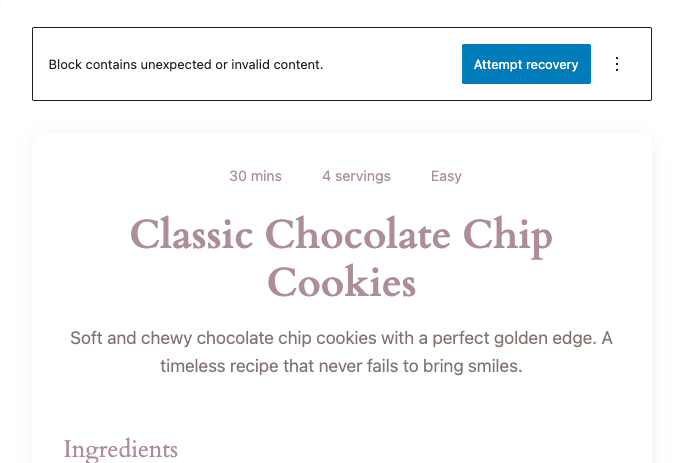
You could click the attempt recovery button and then save the block and this would go away. BUT DON’T. We need to maintain ths state for now.
Block validation errors
Block validation errors happen when the block editor can’t figure out the differences between what is saved in the database and what is being returned from the save function of the block. Open up the console and you will see an error that explains this

The block editor is saying that the contents of save and what is in the database don’t match and it needs help figuring out what to do.
This is where block deprecations come in. When you make a change to static blocks (and this only an issue in static blocks) you need to deprecate the old version of the block. This can be markup only or as you’ll see later on attributes and even inner blocks.
Step 2 – Adding a deprecation for the markup change
Block deprecations are passed to the registerBlockType call in the index.js of your block and is an array of object. You will be using the most common ones in this recipe but for a full list you can refer to the official documentation on deprecations.
To save some time, this recipe has already set up the deprecations file and added the deprecated property to the registerBlockType call.
/**
 * Internal dependencies
 */
import Edit from './edit';
import save from './save';
import metadata from './block.json';
import deprecations from './deprecations';

/**
 * Register the block
 *
 * @see https://developer.wordpress.org/block-editor/reference-guides/block-api/block-registration/
 */
registerBlockType( metadata.name, {
	/**
	 * @see ./edit.js
	 */
	edit: Edit,

	/**
	 * @see ./save.js
	 */
	save,

	/**
	 * @see ./deprecations.js
	 */
	deprecated: deprecations,
} );
The deprecations.js file exports an empty array of deprecations and that is where you’ll be adding yours
/**
 * Array of deprecation objects for the block
 *
 * Each object represents a previous version of the block,
 * ordered from newest to oldest.
 */
const deprecations = [];

export default deprecations;
With the markup change we introduced, we need to provide a deprecation that explains the changes to the block editor.
In deprecations.js, create a new variable called markupChange that will represent the our first deprecation.
const markupChange = {}The main change to this block occurs in the save property so we need to add the OLD markup that was return before we made the change.
Add the following to the markupChange object:
const markupChange = {
	/**
	 * Original version with basic markup
	 */
	attributes: {},
	save: () => {
		return (
			<article { ...useBlockProps.save() }>
				<div className="recipe-header">
					<div className="recipe-meta">
						<span className="recipe-time">
							<i className="dashicons dashicons-clock"></i>
							30 mins
						</span>
						<span className="recipe-servings">
							<i className="dashicons dashicons-groups"></i>4
							servings
						</span>
						<span className="recipe-difficulty">
							<i className="dashicons dashicons-chart-bar"></i>
							Easy
						</span>
					</div>
					<h2 className="recipe-title">
						Classic Chocolate Chip Cookies
					</h2>
					<p className="recipe-description">
						Soft and chewy chocolate chip cookies with a perfect
						golden edge. A timeless recipe that never fails to bring
						smiles.
					</p>
				</div>

				<div className="recipe-content">
					<div className="recipe-ingredients">
						<h3>Ingredients</h3>
						<ul>
							<li>2 1/4 cups all-purpose flour</li>
							<li>1 cup butter, softened</li>
							<li>3/4 cup sugar</li>
							<li>3/4 cup brown sugar</li>
							<li>2 large eggs</li>
							<li>2 cups chocolate chips</li>
						</ul>
					</div>

					<div className="recipe-instructions">
						<h3>Instructions</h3>
						<ol>
							<li>Preheat oven to 375°F (190°C)</li>
							<li>Cream together butter and sugars</li>
							<li>Beat in eggs one at a time</li>
							<li>Mix in dry ingredients</li>
							<li>Fold in chocolate chips</li>
							<li>Bake for 10-12 minutes</li>
						</ol>
					</div>
				</div>

				<footer className="recipe-footer">
					<div className="recipe-tags">
						<span className="tag">Dessert</span>
						<span className="tag">Baking</span>
						<span className="tag">Cookies</span>
					</div>
					<button className="recipe-print">
						<i className="dashicons dashicons-printer"></i>
						Print Recipe
					</button>
				</footer>
			</article>
		);
	},
};
This may seem like a lot but all you’ve done is provide the save function as it was before the adding the toggles. Adding the empty attributes object is a good practice because this block has no attributes and it’s a good idea to explicitly state that in a deprecation in case things change in the future (Spoiler: they will )
Now, update the deprecations to export the new changes:
/**
 * Array of deprecation objects for the block
 *
 * Each object represents a previous version of the block,
 * ordered from newest to oldest.
 */
const deprecations = [ markupChange ];

export default deprecations;
After the block is built you should be able to refresh and now there will be no more error and the new markup will display.
Step 2 – Adding an attribute
The is great block but its not reusable at all. Let’s change that by making the title of the recipe editiable.
Add the following to the block.json to register a new title attribute for the block
{
	"$schema": "https://schemas.wp.org/trunk/block.json",
	"apiVersion": 3,
	"name": "block-developer-cookbook/recipe-block-deprecations",
	"version": "1.0.0",
	"title": "Recipe Block Deprecations",
	"category": "block-developer-cookbook",
	"icon": "buddicons-community",
	"description": "Learn how to manage changes in your static blocks by using block deprecations.",
	"example": {},
	"attributes": {
		"title": {
			"type": "string",
			"default": "Classic Chocolate Chip Cookies"
		}
	},
	"textdomain": "recipe-block-deprecations",
	"editorScript": "file:./index.js",
	"editorStyle": "file:./index.css",
	"style": "file:./style-index.css"
}
In the edit.js file, make the following change to access the new attribute and change the h2 to a RichText component.
/**
 * WordPress Dependencies
 */
import { __ } from '@wordpress/i18n';
import { useBlockProps, RichText } from '@wordpress/block-editor';

/**
 * Edit component for the Recipe Card block
 *
 * @param {Object}   props               Block props.
 * @param {Object}   props.attributes    Block attributes.
 * @param {Function} props.setAttributes Function to set block attributes.
 * @return {WPElement}                   Element to render.
 */
export default function Edit( { attributes, setAttributes } ) {
	const { title } = attributes;
	return (
		<article { ...useBlockProps() }>
			<div className="recipe-header">
				<div className="recipe-meta">
					<span className="recipe-time">
						<i className="dashicons dashicons-clock"></i>
						30 mins
					</span>
					<span className="recipe-servings">
						<i className="dashicons dashicons-groups"></i>4 servings
					</span>
					<span className="recipe-difficulty">
						<i className="dashicons dashicons-chart-bar"></i>
						Easy
					</span>
				</div>
				<RichText
					tagName="h2"
					value={ title }
					onChange={ ( newTitle ) =>
						setAttributes( { title: newTitle } )
					}
				/>
				<p className="recipe-description">
					Soft and chewy chocolate chip cookies with a perfect golden
					edge. A timeless recipe that never fails to bring smiles.
				</p>
			</div>

			<div className="recipe-content">
				<details open className="recipe-ingredients">
					<summary>
						<h3>Ingredients</h3>
					</summary>
					<ul>
						<li>2 1/4 cups all-purpose flour</li>
						<li>1 cup butter, softened</li>
						<li>3/4 cup sugar</li>
						<li>3/4 cup brown sugar</li>
						<li>2 large eggs</li>
						<li>2 cups chocolate chips</li>
					</ul>
				</details>

				<details open className="recipe-instructions">
					<summary>
						<h3>Instructions</h3>
					</summary>
					<ol>
						<li>Preheat oven to 375°F (190°C)</li>
						<li>Cream together butter and sugars</li>
						<li>Beat in eggs one at a time</li>
						<li>Mix in dry ingredients</li>
						<li>Fold in chocolate chips</li>
						<li>Bake for 10-12 minutes</li>
					</ol>
				</details>
			</div>

			<footer className="recipe-footer">
				<div className="recipe-tags">
					<span className="tag">Dessert</span>
					<span className="tag">Baking</span>
					<span className="tag">Cookies</span>
				</div>
				<button className="recipe-print">
					<i className="dashicons dashicons-printer"></i>
					Print Recipe
				</button>
			</footer>
		</article>
	);
}
Now make similar changes in the save.js file to show the new changes on the front end:
/**
 * WordPress Dependencies
 */
import { useBlockProps, RichText } from '@wordpress/block-editor';

/**
 * Save component for the Block Deprecation block
 *
 * @param {Object} props Block props.
 * @return {WPElement} Element to render.
 */
export default function save( { attributes } ) {
	const { title } = attributes;
	return (
		<article { ...useBlockProps.save() }>
			<div className="recipe-header">
				<div className="recipe-meta">
					<span className="recipe-time">
						<i className="dashicons dashicons-clock"></i>
						30 mins
					</span>
					<span className="recipe-servings">
						<i className="dashicons dashicons-groups"></i>4 servings
					</span>
					<span className="recipe-difficulty">
						<i className="dashicons dashicons-chart-bar"></i>
						Easy
					</span>
				</div>
				<RichText.Content
					tagName="h2"
					className="recipe-title"
					value={ title }
				/>
				<p className="recipe-description">
					Soft and chewy chocolate chip cookies with a perfect golden
					edge. A timeless recipe that never fails to bring smiles.
				</p>
			</div>

			<div className="recipe-content">
				<details open className="recipe-ingredients">
					<summary>
						<h3>Ingredients</h3>
					</summary>
					<ul>
						<li>2 1/4 cups all-purpose flour</li>
						<li>1 cup butter, softened</li>
						<li>3/4 cup sugar</li>
						<li>3/4 cup brown sugar</li>
						<li>2 large eggs</li>
						<li>2 cups chocolate chips</li>
					</ul>
				</details>

				<details open className="recipe-instructions">
					<summary>
						<h3>Instructions</h3>
					</summary>
					<ol>
						<li>Preheat oven to 375°F (190°C)</li>
						<li>Cream together butter and sugars</li>
						<li>Beat in eggs one at a time</li>
						<li>Mix in dry ingredients</li>
						<li>Fold in chocolate chips</li>
						<li>Bake for 10-12 minutes</li>
					</ol>
				</details>
			</div>

			<footer className="recipe-footer">
				<div className="recipe-tags">
					<span className="tag">Dessert</span>
					<span className="tag">Baking</span>
					<span className="tag">Cookies</span>
				</div>
				<button className="recipe-print">
					<i className="dashicons dashicons-printer"></i>
					Print Recipe
				</button>
			</footer>
		</article>
	);
}
Rebuild the block and refresh the page. You can now update the title of the recipe as needed! Go ahead and change the title save the post.
Now you get a message from the client that they want to change the name of the attribute from title to name. No problem! Update the block.json, edit.js, and save.js files accordingly.
{
	"$schema": "https://schemas.wp.org/trunk/block.json",
	"apiVersion": 3,
	"name": "block-developer-cookbook/recipe-block-deprecations",
	"version": "1.0.0",
	"title": "Recipe Block Deprecations",
	"category": "block-developer-cookbook",
	"icon": "buddicons-community",
	"description": "Learn how to manage changes in your static blocks by using block deprecations.",
	"example": {},
	"attributes": {
		"name": {
			"type": "string",
			"default": "Classic Chocolate Chip Cookies"
		}
	},
	"textdomain": "recipe-block-deprecations",
	"editorScript": "file:./index.js",
	"editorStyle": "file:./index.css",
	"style": "file:./style-index.css"
}/**
* WordPress Dependencies
*/
import { __ } from '@wordpress/i18n';
import { useBlockProps, RichText } from '@wordpress/block-editor';
/**
* Edit component for the Recipe Card block
*
* @param {Object} props Block props.
* @param {Object} props.attributes Block attributes.
* @param {Function} props.setAttributes Function to set block attributes.
* @return {WPElement} Element to render.
*/
export default function Edit( { attributes, setAttributes } ) {
const { name } = attributes;
return (
<article { ...useBlockProps() }>
<div className="recipe-header">
<div className="recipe-meta">
<span className="recipe-time">
<i className="dashicons dashicons-clock"></i>
30 mins
</span>
<span className="recipe-servings">
<i className="dashicons dashicons-groups"></i>4 servings
</span>
<span className="recipe-difficulty">
<i className="dashicons dashicons-chart-bar"></i>
Easy
</span>
</div>
<RichText
tagName="h2"
className="recipe-title"
value={ name }
onChange={ ( title ) => setAttributes( { title } ) }
placeholder={ __(
'Enter recipe title…',
'block-deprecation'
) }
/>
<p className="recipe-description">
Soft and chewy chocolate chip cookies with a perfect golden
edge. A timeless recipe that never fails to bring smiles.
</p>
</div>
<div className="recipe-content">
<details open className="recipe-ingredients">
<summary>
<h3>Ingredients</h3>
</summary>
<ul>
<li>2 1/4 cups all-purpose flour</li>
<li>1 cup butter, softened</li>
<li>3/4 cup sugar</li>
<li>3/4 cup brown sugar</li>
<li>2 large eggs</li>
<li>2 cups chocolate chips</li>
</ul>
</details>
<details open className="recipe-instructions">
<summary>
<h3>Instructions</h3>
</summary>
<ol>
<li>Preheat oven to 375°F (190°C)</li>
<li>Cream together butter and sugars</li>
<li>Beat in eggs one at a time</li>
<li>Mix in dry ingredients</li>
<li>Fold in chocolate chips</li>
<li>Bake for 10-12 minutes</li>
</ol>
</details>
</div>
<footer className="recipe-footer">
<div className="recipe-tags">
<span className="tag">Dessert</span>
<span className="tag">Baking</span>
<span className="tag">Cookies</span>
</div>
<button className="recipe-print">
<i className="dashicons dashicons-printer"></i>
Print Recipe
</button>
</footer>
</article>
);
}/**
* WordPress Dependencies
*/
import { useBlockProps, RichText } from '@wordpress/block-editor';
/**
* Save component for the Block Deprecation block
*
* @param {Object} props Block props.
* @return {WPElement} Element to render.
*/
export default function save( { attributes } ) {
const { name } = attributes;
return (
<article { ...useBlockProps.save() }>
<div className="recipe-header">
<div className="recipe-meta">
<span className="recipe-time">
<i className="dashicons dashicons-clock"></i>
30 mins
</span>
<span className="recipe-servings">
<i className="dashicons dashicons-groups"></i>4 servings
</span>
<span className="recipe-difficulty">
<i className="dashicons dashicons-chart-bar"></i>
Easy
</span>
</div>
<RichText.Content
tagName="h2"
className="recipe-title"
value={ name }
/>
<p className="recipe-description">
Soft and chewy chocolate chip cookies with a perfect golden
edge. A timeless recipe that never fails to bring smiles.
</p>
</div>
<div className="recipe-content">
<details open className="recipe-ingredients">
<summary>
<h3>Ingredients</h3>
</summary>
<ul>
<li>2 1/4 cups all-purpose flour</li>
<li>1 cup butter, softened</li>
<li>3/4 cup sugar</li>
<li>3/4 cup brown sugar</li>
<li>2 large eggs</li>
<li>2 cups chocolate chips</li>
</ul>
</details>
<details open className="recipe-instructions">
<summary>
<h3>Instructions</h3>
</summary>
<ol>
<li>Preheat oven to 375°F (190°C)</li>
<li>Cream together butter and sugars</li>
<li>Beat in eggs one at a time</li>
<li>Mix in dry ingredients</li>
<li>Fold in chocolate chips</li>
<li>Bake for 10-12 minutes</li>
</ol>
</details>
</div>
<footer className="recipe-footer">
<div className="recipe-tags">
<span className="tag">Dessert</span>
<span className="tag">Baking</span>
<span className="tag">Cookies</span>
</div>
<button className="recipe-print">
<i className="dashicons dashicons-printer"></i>
Print Recipe
</button>
</footer>
</article>
);
}
Rebuild the block and refresh the page and you will see a block validation error.
This is happening because you changed the attribute and it doesn’t match what is in the database. So let’s add a new deprecation in a changeAttributeName variable and export it as part of the deprecations
/**
 * WordPress Dependencies
 */
import { useBlockProps, RichText } from '@wordpress/block-editor';

const changeAttributeName = {
	/**
	 * Version with title attribute before rename to name
	 */
	attributes: {
		title: {
			type: 'string',
			default: 'Classic Chocolate Chip Cookies',
		},
	},
	save: ( { attributes } ) => {
		const { title } = attributes;

		return (
			<article { ...useBlockProps.save() }>
				<div className="recipe-header">
					<div className="recipe-meta">
						<span className="recipe-time">
							<i className="dashicons dashicons-clock"></i>
							30 mins
						</span>
						<span className="recipe-servings">
							<i className="dashicons dashicons-groups"></i>4
							servings
						</span>
						<span className="recipe-difficulty">
							<i className="dashicons dashicons-chart-bar"></i>
							Easy
						</span>
					</div>
					<RichText.Content
						tagName="h2"
						className="recipe-title"
						value={ title }
					/>
					<p className="recipe-description">
						Soft and chewy chocolate chip cookies with a perfect
						golden edge. A timeless recipe that never fails to bring
						smiles.
					</p>
				</div>

				<div className="recipe-content">
					<details open className="recipe-ingredients">
						<summary>
							<h3>Ingredients</h3>
						</summary>
						<ul>
							<li>2 1/4 cups all-purpose flour</li>
							<li>1 cup butter, softened</li>
							<li>3/4 cup sugar</li>
							<li>3/4 cup brown sugar</li>
							<li>2 large eggs</li>
							<li>2 cups chocolate chips</li>
						</ul>
					</details>

					<details open className="recipe-instructions">
						<summary>
							<h3>Instructions</h3>
						</summary>
						<ol>
							<li>Preheat oven to 375°F (190°C)</li>
							<li>Cream together butter and sugars</li>
							<li>Beat in eggs one at a time</li>
							<li>Mix in dry ingredients</li>
							<li>Fold in chocolate chips</li>
							<li>Bake for 10-12 minutes</li>
						</ol>
					</details>
				</div>

				<footer className="recipe-footer">
					<div className="recipe-tags">
						<span className="tag">Dessert</span>
						<span className="tag">Baking</span>
						<span className="tag">Cookies</span>
					</div>
					<button className="recipe-print">
						<i className="dashicons dashicons-printer"></i>
						Print Recipe
					</button>
				</footer>
			</article>
		);
	},
	/**
	 * Migration function to rename title to headline
	 *
	 * @param {Object} attributes - Block attributes
	 * @return {Object} New attributes with renamed property
	 */
	migrate: ( attributes ) => {
		return {
			name: attributes.title,
		};
	},
};

const markupChange = {
	/**
	 * Original version with basic markup
	 */
	attributes: {},
	save: () => {
		return (
			<article { ...useBlockProps.save() }>
				<div className="recipe-header">
					<div className="recipe-meta">
						<span className="recipe-time">
							<i className="dashicons dashicons-clock"></i>
							30 mins
						</span>
						<span className="recipe-servings">
							<i className="dashicons dashicons-groups"></i>4
							servings
						</span>
						<span className="recipe-difficulty">
							<i className="dashicons dashicons-chart-bar"></i>
							Easy
						</span>
					</div>
					<h2 className="recipe-title">
						Classic Chocolate Chip Cookies
					</h2>
					<p className="recipe-description">
						Soft and chewy chocolate chip cookies with a perfect
						golden edge. A timeless recipe that never fails to bring
						smiles.
					</p>
				</div>

				<div className="recipe-content">
					<div className="recipe-ingredients">
						<h3>Ingredients</h3>
						<ul>
							<li>2 1/4 cups all-purpose flour</li>
							<li>1 cup butter, softened</li>
							<li>3/4 cup sugar</li>
							<li>3/4 cup brown sugar</li>
							<li>2 large eggs</li>
							<li>2 cups chocolate chips</li>
						</ul>
					</div>

					<div className="recipe-instructions">
						<h3>Instructions</h3>
						<ol>
							<li>Preheat oven to 375°F (190°C)</li>
							<li>Cream together butter and sugars</li>
							<li>Beat in eggs one at a time</li>
							<li>Mix in dry ingredients</li>
							<li>Fold in chocolate chips</li>
							<li>Bake for 10-12 minutes</li>
						</ol>
					</div>
				</div>

				<footer className="recipe-footer">
					<div className="recipe-tags">
						<span className="tag">Dessert</span>
						<span className="tag">Baking</span>
						<span className="tag">Cookies</span>
					</div>
					<button className="recipe-print">
						<i className="dashicons dashicons-printer"></i>
						Print Recipe
					</button>
				</footer>
			</article>
		);
	},
};

/**
 * Array of deprecation objects for the block
 *
 * Each object represents a previous version of the block,
 * ordered from newest to oldest.
 */
const deprecations = [ markupChange, changeAttributeName ];

export default deprecations;
For this deprecation we again add the save function as it was before we made the change to the attribute but we also add a new property called migrate. This function receives the attributes and innerBlocks for the block and allows you modify them and return what is needed. In your case, we are mapping the value of the old title attribute to the new name attribute.
Once you add this deprecation and rebuild, the block validation error should disappear.
Step 3 – Changing to inner blocks
Now that you can change the name of the recipe, it only makes sense to also be able to customize the Ingredients and Instruction sections. To do that, you’re going to change the hard coded details tag to use inner blocks. Specifically, the Details block that is populated by default with the existing items in the markup.
Go ahead and update the code in the edit.js and save.js with the following
/**
 * WordPress Dependencies
 */
import { __ } from '@wordpress/i18n';
import { useBlockProps, RichText, InnerBlocks } from '@wordpress/block-editor';

/**
 * Edit component for the Recipe Card block
 *
 * @param {Object}   props               Block props.
 * @param {Object}   props.attributes    Block attributes.
 * @param {Function} props.setAttributes Function to set block attributes.
 * @return {WPElement}                   Element to render.
 */
export default function Edit( { attributes, setAttributes } ) {
	const { name } = attributes;

	const TEMPLATE = [
		[
			'core/details',
			{
				summary: 'Ingredients',
				showContent: true,
				className: 'recipe-ingredients',
			},
			[
				[
					'core/list',
					{
						ordered: false,
					},
					[
						[
							'core/list-item',
							{ content: '2 1/4 cups all-purpose flour' },
						],
						[
							'core/list-item',
							{ content: '1 cup butter, softened' },
						],
						[ 'core/list-item', { content: '3/4 cup sugar' } ],
						[
							'core/list-item',
							{ content: '3/4 cup brown sugar' },
						],
						[ 'core/list-item', { content: '2 large eggs' } ],
						[
							'core/list-item',
							{ content: '2 cups chocolate chips' },
						],
					],
				],
			],
		],
		[
			'core/details',
			{
				summary: 'Instructions',
				showContent: true,
				className: 'recipe-instructions',
			},
			[
				[
					'core/list',
					{
						ordered: true,
					},
					[
						[
							'core/list-item',
							{ content: 'Preheat oven to 375°F (190°C)' },
						],
						[
							'core/list-item',
							{ content: 'Cream together butter and sugars' },
						],
						[
							'core/list-item',
							{ content: 'Beat in eggs one at a time' },
						],
						[
							'core/list-item',
							{ content: 'Mix in dry ingredients' },
						],
						[
							'core/list-item',
							{ content: 'Fold in chocolate chips' },
						],
						[
							'core/list-item',
							{ content: 'Bake for 10-12 minutes' },
						],
					],
				],
			],
		],
	];

	return (
		<article { ...useBlockProps() }>
			<div className="recipe-header">
				<div className="recipe-meta">
					<span className="recipe-time">
						<i className="dashicons dashicons-clock"></i>
						30 mins
					</span>
					<span className="recipe-servings">
						<i className="dashicons dashicons-groups"></i>4 servings
					</span>
					<span className="recipe-difficulty">
						<i className="dashicons dashicons-chart-bar"></i>
						Easy
					</span>
				</div>
				<RichText
					tagName="h2"
					className="recipe-title"
					value={ name }
					onChange={ ( title ) => setAttributes( { title } ) }
					placeholder={ __(
						'Enter recipe title…',
						'block-deprecation'
					) }
				/>
				<p className="recipe-description">
					Soft and chewy chocolate chip cookies with a perfect golden
					edge. A timeless recipe that never fails to bring smiles.
				</p>
			</div>

			<div className="recipe-content">
				<InnerBlocks
					template={ TEMPLATE }
					allowedBlocks={ [ 'core/details', 'core/list' ] }
				/>
			</div>

			<footer className="recipe-footer">
				<div className="recipe-tags">
					<span className="tag">Dessert</span>
					<span className="tag">Baking</span>
					<span className="tag">Cookies</span>
				</div>
				<button className="recipe-print">
					<i className="dashicons dashicons-printer"></i>
					Print Recipe
				</button>
			</footer>
		</article>
	);
}/**
* WordPress Dependencies
*/
import { useBlockProps, RichText, InnerBlocks } from '@wordpress/block-editor';
/**
* Save component for the Block Deprecation block
*
* @param {Object} props Block props.
* @return {WPElement} Element to render.
*/
export default function save( { attributes } ) {
const { name } = attributes;
return (
<article { ...useBlockProps.save() }>
<div className="recipe-header">
<div className="recipe-meta">
<span className="recipe-time">
<i className="dashicons dashicons-clock"></i>
30 mins
</span>
<span className="recipe-servings">
<i className="dashicons dashicons-groups"></i>4 servings
</span>
<span className="recipe-difficulty">
<i className="dashicons dashicons-chart-bar"></i>
Easy
</span>
</div>
<RichText.Content
tagName="h2"
className="recipe-title"
value={ name }
/>
<p className="recipe-description">
Soft and chewy chocolate chip cookies with a perfect golden
edge. A timeless recipe that never fails to bring smiles.
</p>
</div>
<div className="recipe-content">
<InnerBlocks.Content />
</div>
<footer className="recipe-footer">
<div className="recipe-tags">
<span className="tag">Dessert</span>
<span className="tag">Baking</span>
<span className="tag">Cookies</span>
</div>
<button className="recipe-print">
<i className="dashicons dashicons-printer"></i>
Print Recipe
</button>
</footer>
</article>
);
}
Rebuild and refresh and you should see another block validation error. This is because, once again, the save output doesn’t match what is in the database. Update the deprecations.js file with the following:
/**
 * WordPress Dependencies
 */
import { useBlockProps, RichText } from '@wordpress/block-editor';
import { createBlock } from '@wordpress/blocks';

const convertListsToInnerBlocks = {
	/**
	 * Version with headline attribute before InnerBlocks conversion
	 */
	attributes: {
		name: {
			type: 'string',
			default: 'Classic Chocolate Chip Cookies',
		},
	},
	save: ( { attributes } ) => {
		const { name } = attributes;
		return (
			<article { ...useBlockProps.save() }>
				<div className="recipe-header">
					<div className="recipe-meta">
						<span className="recipe-time">
							<i className="dashicons dashicons-clock"></i>
							30 mins
						</span>
						<span className="recipe-servings">
							<i className="dashicons dashicons-groups"></i>4
							servings
						</span>
						<span className="recipe-difficulty">
							<i className="dashicons dashicons-chart-bar"></i>
							Easy
						</span>
					</div>
					<RichText.Content
						tagName="h2"
						className="recipe-title"
						value={ name }
					/>
					<p className="recipe-description">
						Soft and chewy chocolate chip cookies with a perfect
						golden edge. A timeless recipe that never fails to bring
						smiles.
					</p>
				</div>

				<div className="recipe-content">
					<details open className="recipe-ingredients">
						<summary>
							<h3>Ingredients</h3>
						</summary>
						<ul>
							<li>2 1/4 cups all-purpose flour</li>
							<li>1 cup butter, softened</li>
							<li>3/4 cup sugar</li>
							<li>3/4 cup brown sugar</li>
							<li>2 large eggs</li>
							<li>2 cups chocolate chips</li>
						</ul>
					</details>

					<details open className="recipe-instructions">
						<summary>
							<h3>Instructions</h3>
						</summary>
						<ol>
							<li>Preheat oven to 375°F (190°C)</li>
							<li>Cream together butter and sugars</li>
							<li>Beat in eggs one at a time</li>
							<li>Mix in dry ingredients</li>
							<li>Fold in chocolate chips</li>
							<li>Bake for 10-12 minutes</li>
						</ol>
					</details>
				</div>

				<footer className="recipe-footer">
					<div className="recipe-tags">
						<span className="tag">Dessert</span>
						<span className="tag">Baking</span>
						<span className="tag">Cookies</span>
					</div>
					<button className="recipe-print">
						<i className="dashicons dashicons-printer"></i>
						Print Recipe
					</button>
				</footer>
			</article>
		);
	},
	/**
	 * Migration function to convert lists to innerblocks
	 *
	 * @param {Object} attributes - Block attributes
	 * @return {Array} Array containing new attributes and inner blocks
	 */
	migrate: ( attributes ) => {
		// Create blocks for ingredients list
		const ingredientItems = [
			'2 1/4 cups all-purpose flour',
			'1 cup butter, softened',
			'3/4 cup sugar',
			'3/4 cup brown sugar',
			'2 large eggs',
			'2 cups chocolate chips',
		].map( ( content ) => createBlock( 'core/list-item', { content } ) );

		// Create blocks for instructions list
		const instructionItems = [
			'Preheat oven to 375°F (190°C)',
			'Cream together butter and sugars',
			'Beat in eggs one at a time',
			'Mix in dry ingredients',
			'Fold in chocolate chips',
			'Bake for 10-12 minutes',
		].map( ( content ) => createBlock( 'core/list-item', { content } ) );

		// Create the inner blocks structure
		const innerBlocks = [
			createBlock(
				'core/details',
				{
					summary: 'Ingredients',
					showContent: true,
					className: 'recipe-ingredients',
				},
				[
					createBlock(
						'core/list',
						{ ordered: false },
						ingredientItems
					),
				]
			),
			createBlock(
				'core/details',
				{
					summary: 'Instructions',
					showContent: true,
					className: 'recipe-instructions',
				},
				[
					createBlock(
						'core/list',
						{ ordered: true },
						instructionItems
					),
				]
			),
		];

		return [ { name: attributes.name }, innerBlocks ];
	},
};

const changeAttributeName = {
	/**
	 * Version with title attribute before rename to name
	 */
	attributes: {
		title: {
			type: 'string',
			default: 'Classic Chocolate Chip Cookies',
		},
	},
	save: ( { attributes } ) => {
		const { title } = attributes;

		return (
			<article { ...useBlockProps.save() }>
				<div className="recipe-header">
					<div className="recipe-meta">
						<span className="recipe-time">
							<i className="dashicons dashicons-clock"></i>
							30 mins
						</span>
						<span className="recipe-servings">
							<i className="dashicons dashicons-groups"></i>4
							servings
						</span>
						<span className="recipe-difficulty">
							<i className="dashicons dashicons-chart-bar"></i>
							Easy
						</span>
					</div>
					<RichText.Content
						tagName="h2"
						className="recipe-title"
						value={ title }
					/>
					<p className="recipe-description">
						Soft and chewy chocolate chip cookies with a perfect
						golden edge. A timeless recipe that never fails to bring
						smiles.
					</p>
				</div>

				<div className="recipe-content">
					<details open className="recipe-ingredients">
						<summary>
							<h3>Ingredients</h3>
						</summary>
						<ul>
							<li>2 1/4 cups all-purpose flour</li>
							<li>1 cup butter, softened</li>
							<li>3/4 cup sugar</li>
							<li>3/4 cup brown sugar</li>
							<li>2 large eggs</li>
							<li>2 cups chocolate chips</li>
						</ul>
					</details>

					<details open className="recipe-instructions">
						<summary>
							<h3>Instructions</h3>
						</summary>
						<ol>
							<li>Preheat oven to 375°F (190°C)</li>
							<li>Cream together butter and sugars</li>
							<li>Beat in eggs one at a time</li>
							<li>Mix in dry ingredients</li>
							<li>Fold in chocolate chips</li>
							<li>Bake for 10-12 minutes</li>
						</ol>
					</details>
				</div>

				<footer className="recipe-footer">
					<div className="recipe-tags">
						<span className="tag">Dessert</span>
						<span className="tag">Baking</span>
						<span className="tag">Cookies</span>
					</div>
					<button className="recipe-print">
						<i className="dashicons dashicons-printer"></i>
						Print Recipe
					</button>
				</footer>
			</article>
		);
	},
	/**
	 * Migration function to rename title to headline
	 *
	 * @param {Object} attributes - Block attributes
	 * @return {Object} New attributes with renamed property
	 */
	migrate: ( attributes ) => {
		return {
			name: attributes.title,
		};
	},
};

const markupChange = {
	/**
	 * Original version with basic markup
	 */
	attributes: {},
	save: () => {
		return (
			<article { ...useBlockProps.save() }>
				<div className="recipe-header">
					<div className="recipe-meta">
						<span className="recipe-time">
							<i className="dashicons dashicons-clock"></i>
							30 mins
						</span>
						<span className="recipe-servings">
							<i className="dashicons dashicons-groups"></i>4
							servings
						</span>
						<span className="recipe-difficulty">
							<i className="dashicons dashicons-chart-bar"></i>
							Easy
						</span>
					</div>
					<h2 className="recipe-title">
						Classic Chocolate Chip Cookies
					</h2>
					<p className="recipe-description">
						Soft and chewy chocolate chip cookies with a perfect
						golden edge. A timeless recipe that never fails to bring
						smiles.
					</p>
				</div>

				<div className="recipe-content">
					<div className="recipe-ingredients">
						<h3>Ingredients</h3>
						<ul>
							<li>2 1/4 cups all-purpose flour</li>
							<li>1 cup butter, softened</li>
							<li>3/4 cup sugar</li>
							<li>3/4 cup brown sugar</li>
							<li>2 large eggs</li>
							<li>2 cups chocolate chips</li>
						</ul>
					</div>

					<div className="recipe-instructions">
						<h3>Instructions</h3>
						<ol>
							<li>Preheat oven to 375°F (190°C)</li>
							<li>Cream together butter and sugars</li>
							<li>Beat in eggs one at a time</li>
							<li>Mix in dry ingredients</li>
							<li>Fold in chocolate chips</li>
							<li>Bake for 10-12 minutes</li>
						</ol>
					</div>
				</div>

				<footer className="recipe-footer">
					<div className="recipe-tags">
						<span className="tag">Dessert</span>
						<span className="tag">Baking</span>
						<span className="tag">Cookies</span>
					</div>
					<button className="recipe-print">
						<i className="dashicons dashicons-printer"></i>
						Print Recipe
					</button>
				</footer>
			</article>
		);
	},
};
/**
 * Array of deprecation objects for the block
 *
 * Each object represents a previous version of the block,
 * ordered from newest to oldest.
 */
const deprecations = [
	markupChange,
	changeAttributeName,
	convertListsToInnerBlocks,
];

export default deprecations;
That’s a lot of code so let’s break it down. The attributes and save properties are again recording the state for those items before the change to InnerBlocks was made. The migrate function is doing much more than last time. It’s not only mapping the attributes but also creating the innerBlocks that will be inserted as defaults using the createBlock function.
Once you add and export the new convertListsToInnerBlocks deprecation, the block validation should go away.
Congrats Chef!