Overview
In this recipe, we’re taking a static block and transforming it into a dynamic block. You’ll learn how to move the logic from the editor into PHP, letting your block serve up fresh content every time it’s rendered—like switching from a prepackaged meal to something cooked to order. Let’s fire up the stove and get dynamic! 🔥👨🍳
Setup
You can choose to either use the repository which provides a development environment or to just download the standalone plugin
Standalone
Instructions
Run the following command in a terminal of your choice from inside the plugins directory of your local WordPress installation.
npx @wordpress/create-block@latest convert-static-block --template @block-developer-cookbook/convert-static-blockOnce the scaffold has completed completed, start the build process from inside the newly created plugin
cd convert-static-block && npm run startFinally, make sure to activate the plugin.
Repository
Instructions
Checkout the repository (skip this step if already done)
git clone git@github.com:ryanwelcher/block-developer-cookbook.gitInstall the dependencies
npm installStart the development environment (make sure you have Docker installed )
npm run env startRun the following script from the root of the repository
npm run prep:convert-static-blockOnce the scaffold has completed completed, start the build process from inside the newly created plugin
cd plugins/convert-static-block && npm run startStep 1 – Overriding rendering on the front end
For this recipe, we’re going to continue working with the Recipe block we created in the Block Deprecations recipe. After all of the changes we did to the block to allow it to be more editable and reusable, the client created 1500 new recipe pages each with an instance of that block. Now they have asked for another change and want to be sure that the changes are reflected on all 1500 pages!
One of the drawbacks of using a static block is that while we can make changes to the structure of the block, each existing instance of the block will need to be saved manually in order for the changes to be reflected – which is just not feasible for this client.
Luckily for us, dynamic blocks do not have this limitation so let’s start the process of converting this block from static to dynamic
First, insert an instance of the block into a piece of content and publish it.
Next, open the src/render.php file to see it’s contents:
<?php
/**
 * Render.php
 */

?>
<div>Hi from render.php</div>There is not much there when we compare it to the save.js file:
/**
 * WordPress Dependencies
 */
import { useBlockProps, RichText, InnerBlocks } from '@wordpress/block-editor';

/**
 * Save component for the Recipe Card block
 *
 * @param {Object} props            Block props.
 * @param {Object} props.attributes Block attributes.
 * @return {WPElement}              Element to render.
 */
export default function save( { attributes } ) {
	const { name } = attributes;

	return (
		<article { ...useBlockProps.save() }>
			<div className="recipe-header">
				<div className="recipe-meta">
					<span className="recipe-time">
						<i className="dashicons dashicons-clock"></i>
						30 mins
					</span>
					<span className="recipe-servings">
						<i className="dashicons dashicons-groups"></i>4 servings
					</span>
					<span className="recipe-difficulty">
						<i className="dashicons dashicons-chart-bar"></i>
						Easy
					</span>
				</div>
				<RichText.Content
					tagName="h2"
					className="recipe-title"
					value={ name }
				/>
				<p className="recipe-description">
					Soft and chewy chocolate chip cookies with a perfect golden
					edge. A timeless recipe that never fails to bring smiles.
				</p>
			</div>

			<div className="recipe-content">
				<InnerBlocks.Content />
			</div>

			<footer className="recipe-footer">
				<div className="recipe-tags">
					<span className="tag">Dessert</span>
					<span className="tag">Baking</span>
					<span className="tag">Cookies</span>
				</div>
				<button className="recipe-print">
					<i className="dashicons dashicons-printer"></i>
					Print Recipe
				</button>
			</footer>
		</article>
	);
}Add the following to the block.json file to tell the block that it now has a render.php file.
{
	"$schema": "https://schemas.wp.org/trunk/block.json",
	"apiVersion": 3,
	"name": "create-block/block-deprecation",
	"version": "0.1.0",
	"title": "Block Deprecation",
	"category": "widgets",
	"icon": "",
	"description": "Example block scaffolded with Create Block tool.",
	"example": {},
	"supports": {
		"html": false
	},
	"attributes": {
		"name": {
			"type": "string",
			"default": "Classic Chocolate Chip Cookies"
		}
	},
	"textdomain": "block-deprecation",
	"editorScript": "file:./index.js",
	"editorStyle": "file:./index.css",
	"style": "file:./style-index.css",
	"render": "file:./render.php"
}Rebuild the block and when you view the front end, you should see this:
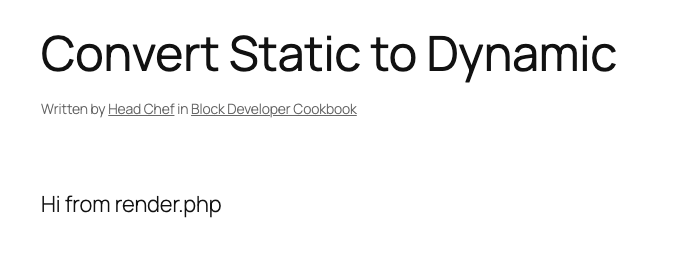
What is happening here is that when a render.php file exists for a block, it automatically take precedence over whatever is saved in the post content and it’s contents are shown instead.
Notes:
Step 2 – Overriding the save process
Go back to the block editor and make a change to the recipe to call for 200 cups of sugar, and then save the post. If you switch to the Code Editor view, you’ll see that any changes you make in the post editor are being saved to the post content.

This is not what we’re looking for as we want to control the markup via render.php and not have it saved to the post content – even though it’s not being rendered on the front end.
Random Thought
This does provide an interesting concept of having a block generate a backup. One drawback of a dynamic block is that if this plugin that provides the custom block is deactivate, the block will no longer render at all. By keeping this save in place, there would still be the markup stored in the post content and it would still display.
The main issues with this approach are that now any new changes will need to be reflected in edit.js, save.js, and now in render.php and there will need to be deprecations registered to avoid block validation errors.
Update the src/index.js file with the following code to no longer return anything from the save property of the block:
/**
 * WordPress dependencies
 */
import { registerBlockType } from '@wordpress/blocks';

/**
 * Lets webpack process CSS, SASS or SCSS files referenced in JavaScript files.
 * All files containing `style` keyword are bundled together. The code used
 * gets applied both to the front of your site and to the editor.
 *
 * @see https://www.npmjs.com/package/@wordpress/scripts#using-css
 */
import './style.scss';

/**
 * Internal dependencies
 */
import Edit from './edit';
import save from './save';
import metadata from './block.json';
import deprecations from './deprecations';

/**
 * Register the block
 *
 * @see https://developer.wordpress.org/block-editor/reference-guides/block-api/block-registration/
 */
registerBlockType( metadata.name, {
	/**
	 * @see ./edit.js
	 */
	edit: Edit,

	/**
	 * @see ./save.js
	 */
	save: () => null,

	/**
	 * @see ./deprecations.js
	 */
	deprecated: deprecations,
} );Go back to the block editor and refresh the page. If you had already saved the old version of the block, you’ll see a block validation error.
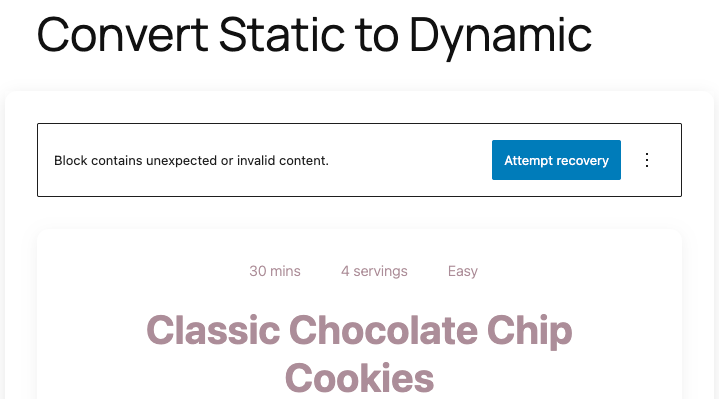
As we know, block validation errors occur when the save property returns something different than was is stored in the post content. Considering we just told save to return null, this is very much expected but will only affect existing blocks that were inserted before this change was made.
Don’t make any changes or save the post. We want to persist this state and fix it ourselves.
To fix this, we need to add a deprecation that describes that the block used to look like before the change including it’s attributes and markup returns by the save function.
Open deprecations.js and add the following:
/**
 * WordPress Dependencies
 */
import { useBlockProps, RichText, InnerBlocks } from '@wordpress/block-editor';

/**
 * Array of deprecation objects for the block
 *
 * Each object represents a previous version of the block,
 * ordered from newest to oldest.
 */
const deprecations = [
	{
		attributes: {
			name: {
				type: 'string',
				default: 'Classic Chocolate Chip Cookies',
			},
		},

		save: ( { attributes } ) => {
			const { name } = attributes;

			return (
				<article { ...useBlockProps.save() }>
					<div className="recipe-header">
						<div className="recipe-meta">
							<span className="recipe-time">
								<i className="dashicons dashicons-clock"></i>
								30 mins
							</span>
							<span className="recipe-servings">
								<i className="dashicons dashicons-groups"></i>4
								servings
							</span>
							<span className="recipe-difficulty">
								<i className="dashicons dashicons-chart-bar"></i>
								Easy
							</span>
						</div>
						<RichText.Content
							tagName="h2"
							className="recipe-title"
							value={ name }
						/>
						<p className="recipe-description">
							Soft and chewy chocolate chip cookies with a perfect
							golden edge. A timeless recipe that never fails to
							bring smiles.
						</p>
					</div>

					<div className="recipe-content">
						<InnerBlocks.Content />
					</div>

					<footer className="recipe-footer">
						<div className="recipe-tags">
							<span className="tag">Dessert</span>
							<span className="tag">Baking</span>
							<span className="tag">Cookies</span>
						</div>
						<button className="recipe-print">
							<i className="dashicons dashicons-printer"></i>
							Print Recipe
						</button>
					</footer>
				</article>
			);
		},
	},
];

export default deprecations;
Rebuild the block and refresh the page to see that the block validation has gone away.
Make another change to the block (maybe reduce the amount of sugar?!), save the post, and view the code editor again. You will see a much different block. This is how dynamic blocks are stored in post content – basically a placeholder and render.php handles the rendering.

Step 3 – Rendering the front end.
If you view the front end, we’re still seeing the simple hardcoded message from before.
Let’s update the file to output the structure we need.
Update render.php with the following:
<?php
/**
 * Render.php
 */

?>
<article <?php echo wp_kses_data( get_block_wrapper_attributes() ); ?>>
	<div class="recipe-header">
			<div class="recipe-meta">
				<span class="recipe-time">
					<i class="dashicons dashicons-clock"></i>
					30 mins
				</span>
				<span class="recipe-servings">
					<i class="dashicons dashicons-groups"></i>4 servings
				</span>
				<span class="recipe-difficulty">
					<i class="dashicons dashicons-chart-bar"></i>
					Easy
				</span>
			</div>
			<h2>TITLE HERE</h2>
			<p class="recipe-description">
				Soft and chewy chocolate chip cookies with a perfect golden
				edge. A timeless recipe that never fails to bring smiles.
			</p>
		</div>

		<div class="recipe-content">
			RECIPE CONTENT
		</div>

		<footer class="recipe-footer">
			<div class="recipe-tags">
				<span class="tag">Dessert</span>
				<span class="tag">Baking</span>
				<span class="tag">Cookies</span>
			</div>
			<button class="recipe-print">
				<i class="dashicons dashicons-printer"></i>
				Print Recipe
			</button>
		</footer>
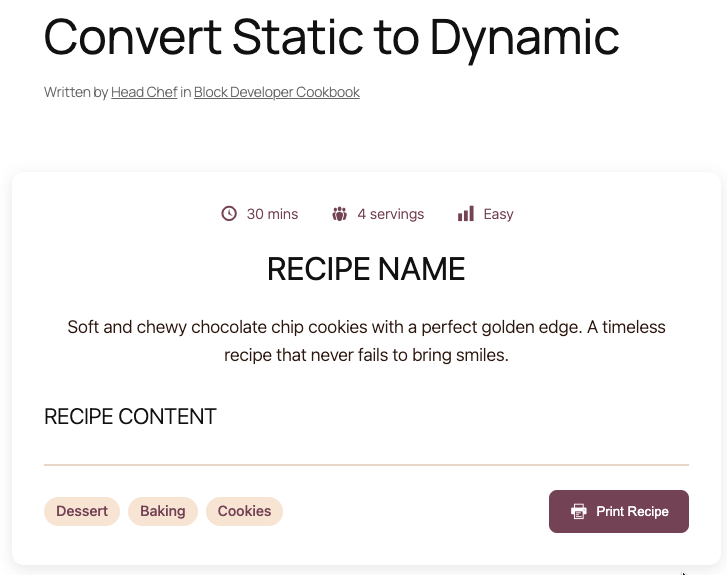
</article>The front end should now look a lot closer to the back end with the exception of a couple of placeholder for recipe name and content.
The name is stored as an attribute so let’s retrieve that and display it.
<?php
/**
 * Render.php
 */

$name = $attributes['name']
?>
<article <?php echo wp_kses_data( get_block_wrapper_attributes() ); ?>>
	<div class="recipe-header">
			<div class="recipe-meta">
				<span class="recipe-time">
					<i class="dashicons dashicons-clock"></i>
					30 mins
				</span>
				<span class="recipe-servings">
					<i class="dashicons dashicons-groups"></i>4 servings
				</span>
				<span class="recipe-difficulty">
					<i class="dashicons dashicons-chart-bar"></i>
					Easy
				</span>
			</div>
			<h2><?php echo esc_html( $name ); ?></h2>
			<p class="recipe-description">
				Soft and chewy chocolate chip cookies with a perfect golden
				edge. A timeless recipe that never fails to bring smiles.
			</p>
		</div>

		<div class="recipe-content">
			RECIPE CONTENT
		</div>

		<footer class="recipe-footer">
			<div class="recipe-tags">
				<span class="tag">Dessert</span>
				<span class="tag">Baking</span>
				<span class="tag">Cookies</span>
			</div>
			<button class="recipe-print">
				<i class="dashicons dashicons-printer"></i>
				Print Recipe
			</button>
		</footer>
</article>Because we’re using an InnerBlock instance to manage the recipe content, we need to modify our save property to return that content to be used in our render.php
Update the index.js with the following:
/**
 * WordPress dependencies
 */
import { registerBlockType, InnerBlocks } from '@wordpress/blocks';

/**
 * Lets webpack process CSS, SASS or SCSS files referenced in JavaScript files.
 * All files containing `style` keyword are bundled together. The code used
 * gets applied both to the front of your site and to the editor.
 *
 * @see https://www.npmjs.com/package/@wordpress/scripts#using-css
 */
import './style.scss';

/**
 * Internal dependencies
 */
import Edit from './edit';
import save from './save';
import metadata from './block.json';
import deprecations from './deprecations';

/**
 * Register the block
 *
 * @see https://developer.wordpress.org/block-editor/reference-guides/block-api/block-registration/
 */
registerBlockType( metadata.name, {
	/**
	 * @see ./edit.js
	 */
	edit: Edit,

	/**
	 * @see ./save.js
	 */
	save: () => <InnerBlocks.Content />,

	/**
	 * @see ./deprecations.js
	 */
	deprecated: deprecations,
} );With this in place, we now have access to the markup returned from the InnerBlocks component inside the globally available $content variable.
Update the render.php to display the content:
<?php
/**
 * Render.php
 */

$name = $attributes['name'];
?>
<article <?php echo wp_kses_data( get_block_wrapper_attributes() ); ?>>
	<div class="recipe-header">
			<div class="recipe-meta">
				<span class="recipe-time">
					<i class="dashicons dashicons-clock"></i>
					30 mins
				</span>
				<span class="recipe-servings">
					<i class="dashicons dashicons-groups"></i>4 servings
				</span>
				<span class="recipe-difficulty">
					<i class="dashicons dashicons-chart-bar"></i>
					Easy
				</span>
			</div>
			<h2><?php echo esc_html( $name ); ?></h2>
			<p class="recipe-description">
				Soft and chewy chocolate chip cookies with a perfect golden
				edge. A timeless recipe that never fails to bring smiles.
			</p>
		</div>

		<div class="recipe-content">
			<?php echo wp_kses_post( $content ); ?>
		</div>

		<footer class="recipe-footer">
			<div class="recipe-tags">
				<span class="tag">Dessert</span>
				<span class="tag">Baking</span>
				<span class="tag">Cookies</span>
			</div>
			<button class="recipe-print">
				<i class="dashicons dashicons-printer"></i>
				Print Recipe
			</button>
		</footer>
</article>Well done!